Don’t miss any critical events thanks to agentic automations

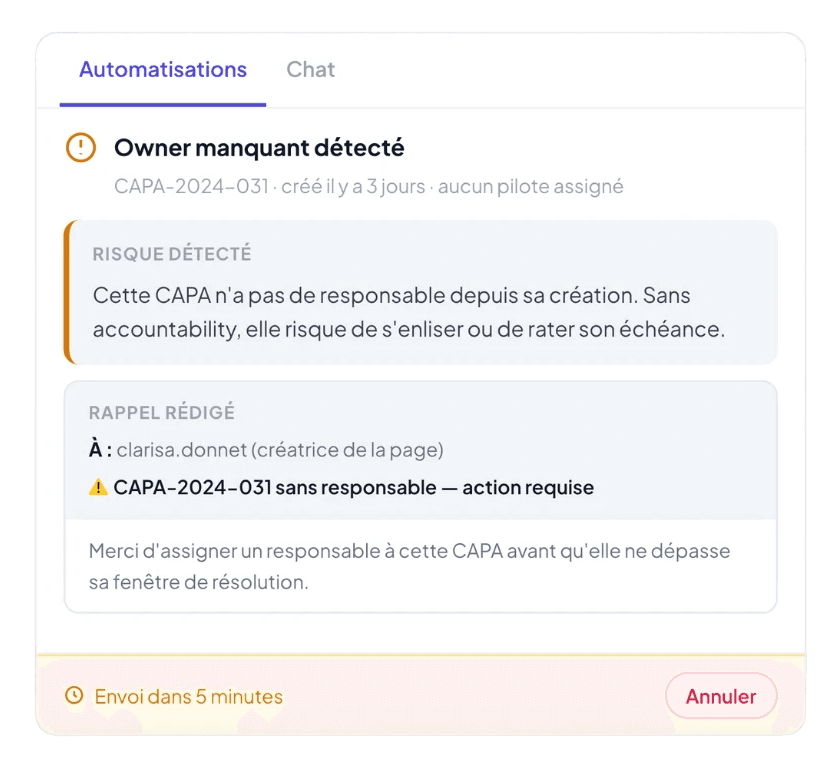
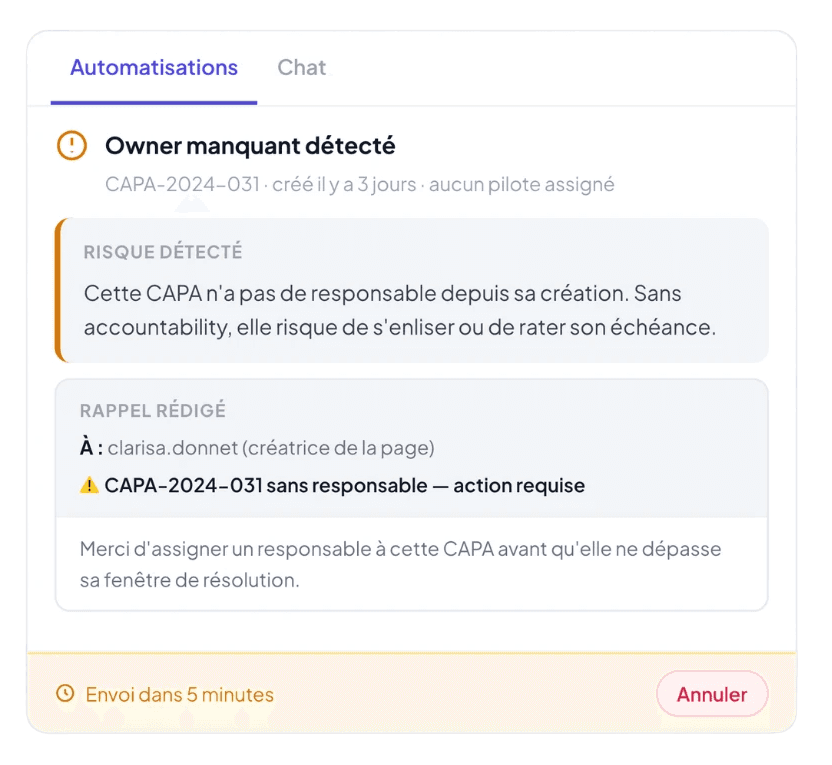
Set up the triggers and actions once. As soon as a specific event occurs, Yxir automatically initiates the necessary sequence of actions: whether that involves analysing the causes, notifying the relevant people, or updating your file… without having to wait for an expert to remember or become available to do it.
Automate to prevent delays

Avoid oversights

by automatically detecting every instance.

Make tracking easy

by automatically notifying the relevant people.

Speed up the decision

by automatically preparing the information needed.

How it works

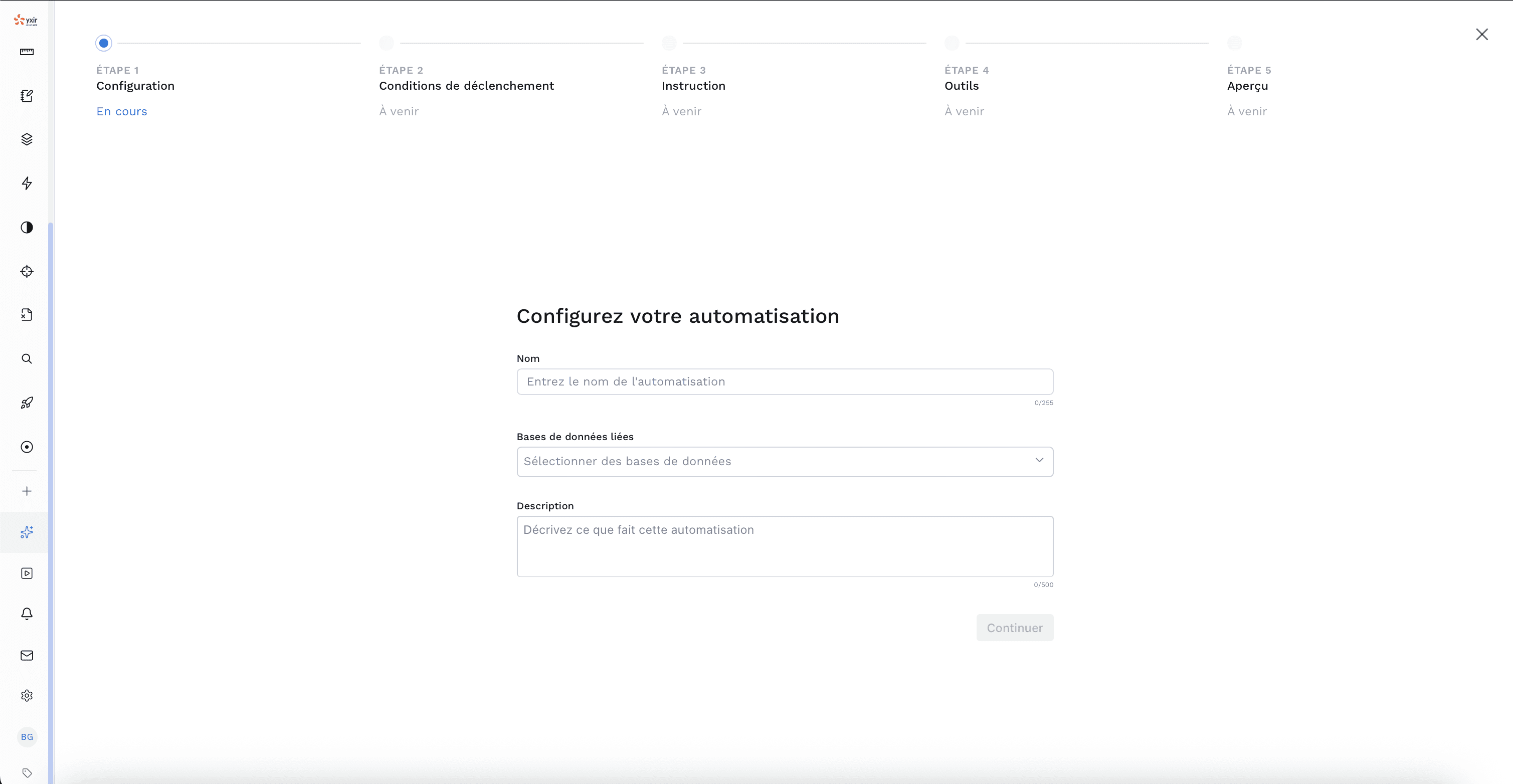
  1. Set up your trigger

  1. Set up your trigger

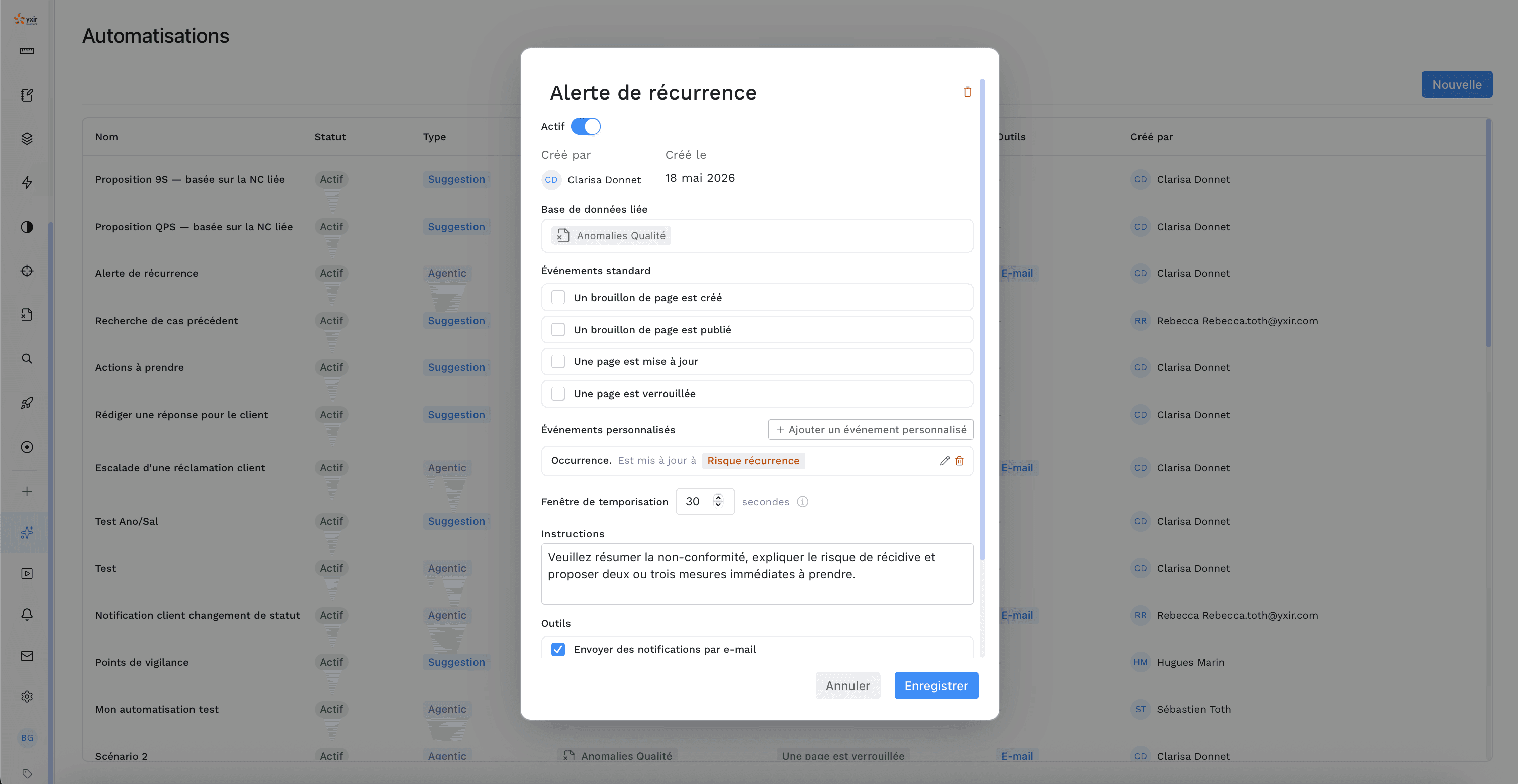
Configure the events to monitor: deviation reaching 3 occurrences, deadline approaching, severity changed to “Critical”, validation rejected, declaration updated…

Yxir will detect whether these events occur in the designated database(s).
  1. Link it to AI actions

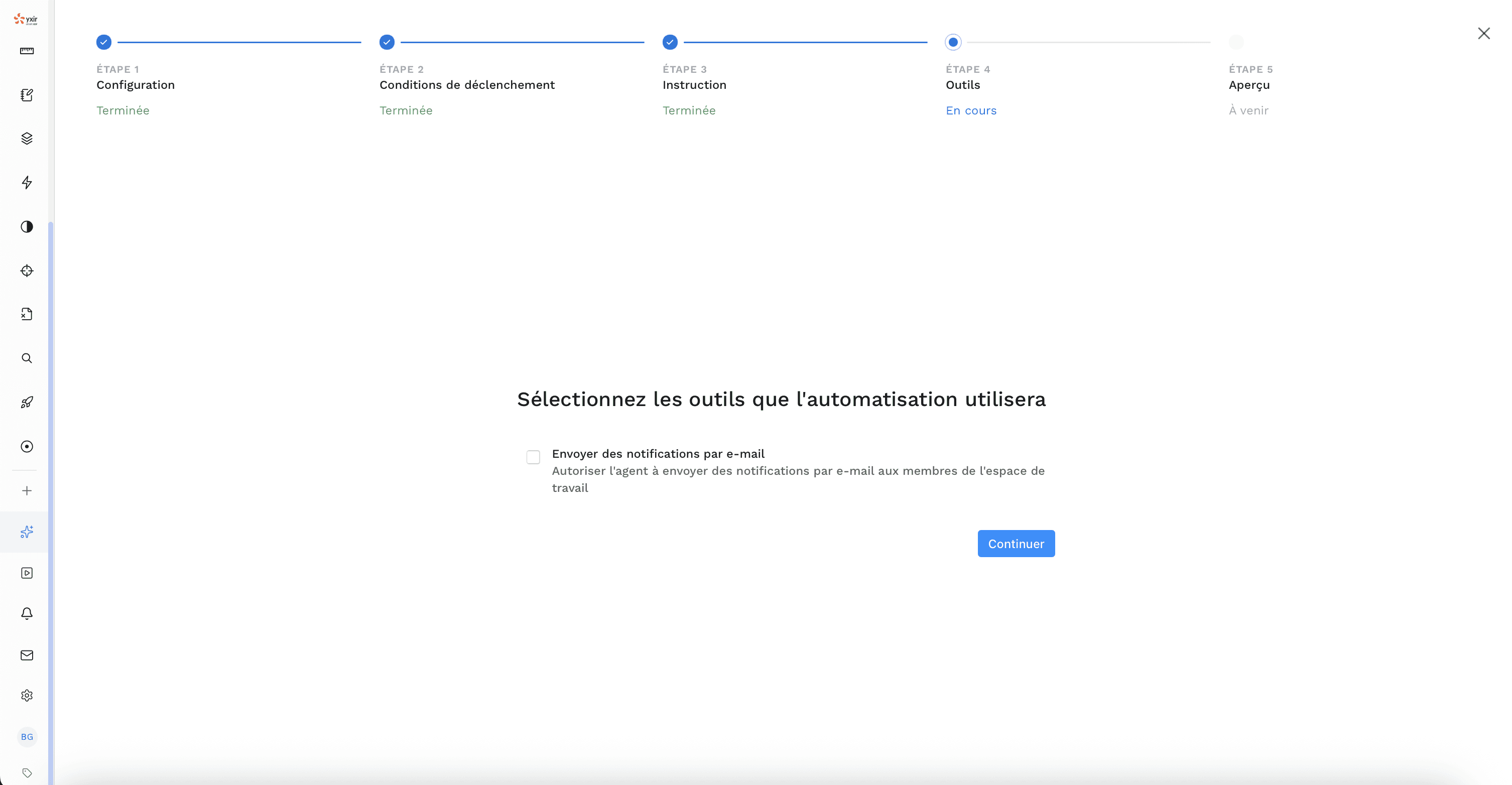
  1. Link it to AI actions

For each event, select the appropriate actions: automatically update other relevant data, notify stakeholders via a personalised email…

Yxir executes this sequence as soon as the event occurs.
  1. The AI agent logs its actions

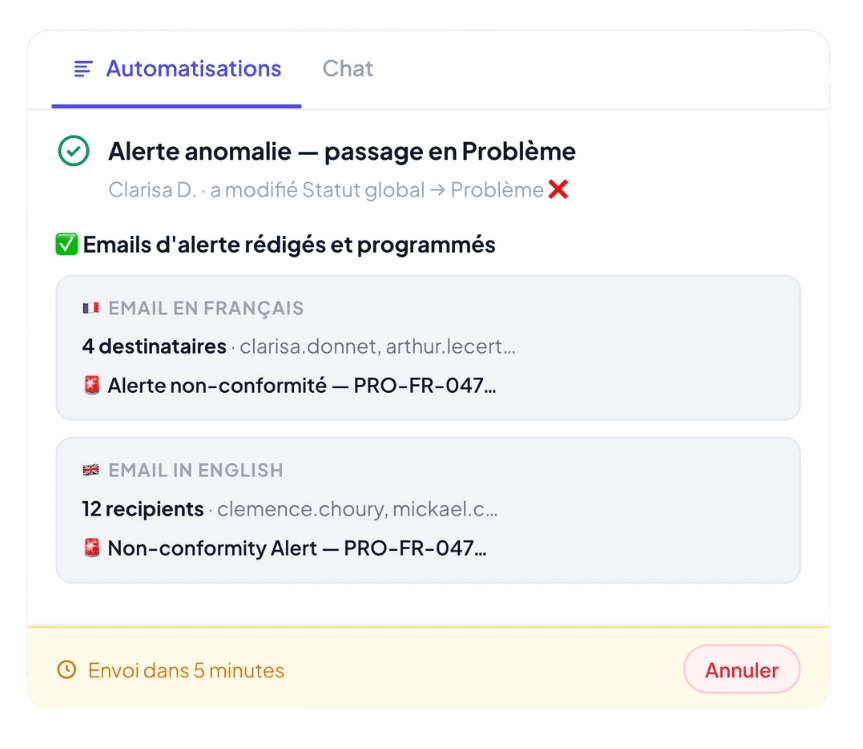
  1. The AI agent logs its actions

As soon as a configured event occurs, Yxir automatically triggers the defined actions.

The results appear in the record’s timeline: the triggering event, the action taken, the link to the various elements… Everything is visible, traceable and immediately available to the team.
How our customers automate their tasks in Yxir
  • Automatically escalate critical cases

    The challenge with critical cases is not only to detect them, but also to address them as quickly as possible.

    With agent-based automation in Yxir, you can set up complex triggers to ensure you never miss a single case. This is followed by a series of automatic and relevant actions powered by AI: alerting managers, contacting the relevant experts, triggering priority actions, summarising the situation for stakeholders...

    AI guidance for drafting an NCR
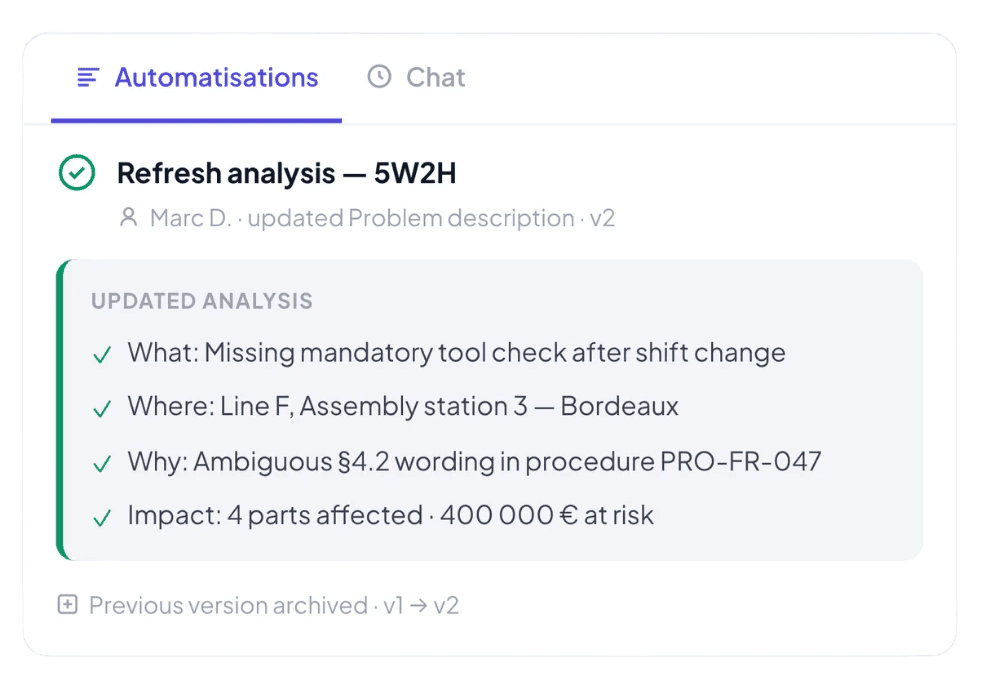
  • Keeping analyses up to date as product sheets change

    In investigations and CAPA processes, the description of the problem often changes, rendering the resulting documents obsolete (structured analysis, briefs, justification, etc.).

    With agent-based automation in Yxir, you can ensure that, every time a change is approved, the AI re-reads the page, compares what has changed, and updates the analysis. This happens only if the change is significant – for example, to ignore cosmetic changes – whilst merging successive sequences of actions into a single, clean execution.

    AI guidance for drafting an NCR
  • Avoiding delays and missed deadlines

    The most common reasons for a task falling behind schedule are the lack of a designated person in charge and a deadline.

    With Yxir’s agent-based automations, you can detect when an important field has not been filled in and alert the page creator. As a deadline approaches, and depending on the context, the AI can send personalised reminders to the relevant people.

    AI guidance for drafting an NCR
  • Briefing new participants on an ongoing project or during a handover

    In the event of a change in team, manager, or simply when a new stakeholder joins, the new person arrives without a clear understanding of what is currently underway and what is expected. This requires a significant amount of training or handover work.

    With Yxir’s agent-based automations, you can automatically generate personalised summaries tailored to the context (project, ongoing tasks, expectations, etc.) as soon as a new person joins a project. Thanks to AI, these summaries will not only be comprehensive and properly sourced, but also automatically updated.

    AI guidance for drafting an NCR
  • Automatically escalate critical cases

    The challenge with critical cases is not only to detect them, but also to address them as quickly as possible.

    With agent-based automation in Yxir, you can set up complex triggers to ensure you never miss a single case. This is followed by a series of automatic and relevant actions powered by AI: alerting managers, contacting the relevant experts, triggering priority actions, summarising the situation for stakeholders...

    AI guidance for drafting an NCR
  • Keeping analyses up to date as product sheets change

    In investigations and CAPA processes, the description of the problem often changes, rendering the resulting documents obsolete (structured analysis, briefs, justification, etc.).

    With agent-based automation in Yxir, you can ensure that, every time a change is approved, the AI re-reads the page, compares what has changed, and updates the analysis. This happens only if the change is significant – for example, to ignore cosmetic changes – whilst merging successive sequences of actions into a single, clean execution.

    AI guidance for drafting an NCR
  • Avoiding delays and missed deadlines

    The most common reasons for a task falling behind schedule are the lack of a designated person in charge and a deadline.

    With Yxir’s agent-based automations, you can detect when an important field has not been filled in and alert the page creator. As a deadline approaches, and depending on the context, the AI can send personalised reminders to the relevant people.

    AI guidance for drafting an NCR
  • Briefing new participants on an ongoing project or during a handover

    In the event of a change in team, manager, or simply when a new stakeholder joins, the new person arrives without a clear understanding of what is currently underway and what is expected. This requires a significant amount of training or handover work.

    With Yxir’s agent-based automations, you can automatically generate personalised summaries tailored to the context (project, ongoing tasks, expectations, etc.) as soon as a new person joins a project. Thanks to AI, these summaries will not only be comprehensive and properly sourced, but also automatically updated.

    AI guidance for drafting an NCR
  • Automatically escalate critical cases

    The challenge with critical cases is not only to detect them, but also to address them as quickly as possible.

    With agent-based automation in Yxir, you can set up complex triggers to ensure you never miss a single case. This is followed by a series of automatic and relevant actions powered by AI: alerting managers, contacting the relevant experts, triggering priority actions, summarising the situation for stakeholders...

    AI guidance for drafting an NCR
  • Keeping analyses up to date as product sheets change

    In investigations and CAPA processes, the description of the problem often changes, rendering the resulting documents obsolete (structured analysis, briefs, justification, etc.).

    With agent-based automation in Yxir, you can ensure that, every time a change is approved, the AI re-reads the page, compares what has changed, and updates the analysis. This happens only if the change is significant – for example, to ignore cosmetic changes – whilst merging successive sequences of actions into a single, clean execution.

    AI guidance for drafting an NCR
  • Avoiding delays and missed deadlines

    The most common reasons for a task falling behind schedule are the lack of a designated person in charge and a deadline.

    With Yxir’s agent-based automations, you can detect when an important field has not been filled in and alert the page creator. As a deadline approaches, and depending on the context, the AI can send personalised reminders to the relevant people.

    AI guidance for drafting an NCR
  • Briefing new participants on an ongoing project or during a handover

    In the event of a change in team, manager, or simply when a new stakeholder joins, the new person arrives without a clear understanding of what is currently underway and what is expected. This requires a significant amount of training or handover work.

    With Yxir’s agent-based automations, you can automatically generate personalised summaries tailored to the context (project, ongoing tasks, expectations, etc.) as soon as a new person joins a project. Thanks to AI, these summaries will not only be comprehensive and properly sourced, but also automatically updated.

    AI guidance for drafting an NCR

Designed to save time with peace of mind

100% supervised actions

The AI only carries out what it is asked to do, without ever taking any uncontrolled initiative.

Secure and cancellable emails

Permissions prevent external emails, and a minimum delay is always applied to allow a scheduled email to be cancelled.

Fully traceable timeline

Every execution appears on the page, including the trigger reason, actions taken, result and status. Nothing is hidden.

Smart debouncing

Successive actions are merged into a single execution wherever possible to avoid flooding and duplicates.

Smart interruption

If, for example, the trigger is merely cosmetic, the AI recognises this and cancels the automation trigger.

Anti-excess limits

Excessive usage is automatically detected and flagged to prevent credits from being used up unnecessarily.

We’re really happy with Yxir – it’s much more user-friendly than Excel and makes it easier to get a clear overview of all incidents.

User
FAQ

Frequently asked questions

If you don't find your answer, contact us!

Can automations create corrective actions without human approval?

Can Yxir automatically send emails to external contacts?

How can I see what has been triggered automatically?

Do automations generate noise or unnecessary notifications?

How can I set up events and actions without technical expertise?

Can we have different automations for each site or product type?

What happens if I want to change an automation that has already been set up?

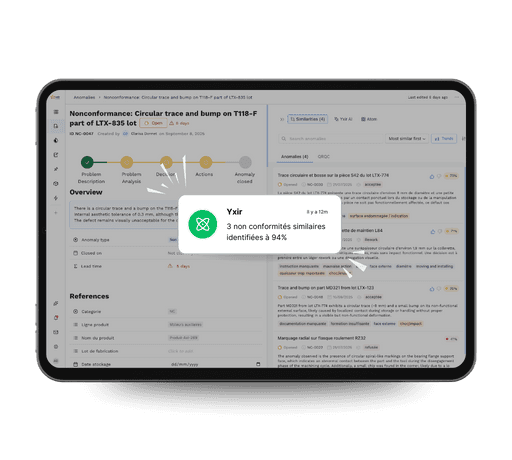
Yxir application screen with notification of similar non-conformities detection, illustrating the platform's added value

Discover Yxir in action on your quality challenges

Book a personalized demo and discover how our industry-focused platform reduces your non-conformances, speeds up your resolutions and improves your performance indicators.

Discover Yxir in action on your quality challenges

Book a personalized demo and discover how our industry-focused platform reduces your non-conformances, speeds up your resolutions and improves your performance indicators.

Discover Yxir in action on your quality challenges

Book a personalized demo and discover how our industry-focused platform reduces your non-conformances, speeds up your resolutions and improves your performance indicators.