QMS Software: how to choose the right solution and succeed in deployment

Would you like to reduce non-conformances while speeding up your quality processes? Would you like to choose QMS software tailored to your industry without wasting time on long and costly proofs of concept? In this article, you will find clear explanations, operational criteria and concrete advice for managing quality.
Would you like to reduce non-conformances while accelerating your quality processes?
Would you like to choose a QMS software tailored to your industry without wasting time on long and costly proofs of concept?
In this article, you will find clear explanations, operational criteria, and concrete advice to manage quality in energy, aerospace, or automotive.
We guide you step-by-step to define your needs, compare solutions, and prepare for implementation.
By the end of this first half, you will know why a QMS software is critical and which functionalities required by your teams must not be ignored.
What is a QMS software?
Definition and key roles
A QMS software is a digital platform that centralises the management of the quality management system.
It structures processes, tracks quality events, and orchestrates corrective and preventive action plans.
Its main role is to ensure regulatory compliance while improving operational performance.
In concrete terms, it replaces manual processes and scattered folders with automated workflows, alerts, and reports.
For quality managers and production directors, a QMS software becomes a daily management tool and a single reference system for audits.

Link with ISO 9001 and PDCA standards
A QMS software must reflect the PDCA (Plan, Do, Check, Act) cycle at the heart of ISO 9001.
It helps to formalise the quality plan, execute processes, measure results, and launch corrective actions.
The traceability of decisions and records generated by the software facilitates external audits.
To be useful, the tool must allow for the documentation of quality policy, objectives, risks, and opportunities in accordance with ISO 9001.
Thus, compliance with the standard becomes an integrated feature, not an isolated administrative task.
Productivity gains and compliance
Are you losing time consolidating Excel data and disparate reports?
A QMS software automates the flow of information and reduces repetitive tasks.
The standardisation of processes reduces human error and accelerates decision-making.
By automating notifications, task allocation, and validations, you free up time for high-value actions.
Compliance becomes simpler because proofs are centralised and time-stamped.
Investing in a QMS software often translates into a reduction in audit discrepancies and an improvement in operational performance.

Why invest in QMS software?
Improved traceability and transparency
Traceability is key in the aerospace, automotive, and energy industries.
A QMS software ensures the digital audit trail of any non-conformance, from detection to closure.
You can trace who validated what, when, and why, with attachments and time-stamped versions.
Transparency facilitates collaboration across sites and with sub-contractors.
It also allows for the rapid identification of root causes and the assessment of the impact on production.
Thus, incident management becomes proactive rather than reactive.
Return on investment and controlled costs
Adopting a QMS software requires an initial investment, but the ROI is quickly measured.
Reducing non-conformances, time spent on audits, and decreases in production downtime are concrete levers.
To calculate the ROI, aggregate productivity gains, avoided costs, and improvements in the compliance rate.
Also consider indirect costs: maintenance of legacy tools, version errors, and team downtime.
Finally, select a QMS software whose business model is transparent to avoid hidden costs related to integrations or advanced options.
Indispensable functional criteria for a QMS software
Introduction
Before evaluating suppliers, clarify the non-negotiable functions.
A QMS software must cover the entire quality cycle, from detection to prevention.
The criteria below translate into what your teams must be able to do from deployment onward.
These functionalities reduce adoption friction and guarantee quick and measurable benefits.
Non-conformance and CAPA management
Managing non-conformances is the heart of QMS software.
The tool must allow for the logging of an incident, prioritisation of the impact, assignment of a manager, and tracking of corrective action progress.
The CAPA module must include justification, timeline, implementation proofs, and effectiveness verification.
In production, the ability to analyse trends and recurrences is essential to move from one-off actions to systemic actions.
Ensure that the QMS software offers audit-ready reports and secure exports.

Automated workflows and action plans
Workflows should reflect your actual processes and not the other way around.
An effective QMS software offers configurable workflow templates based on your business rules.
Automations (reminders, escalations, validations) reduce processing times and the risk of oversight.
The action plan must be accessible in a consolidated view and allow for simple updates via mobile.
Opt for a solution where workflows can be modified without heavy coding and where changes are historicised.
Document management and version control
Quality documentation must no longer circulate as uncontrolled attachments.
A QMS software centralises procedures, operating methods, and records with automatic version control.
Access management must be granular to ensure confidentiality and compliance.
The system must offer document validation workflows and notifications when updates occur.
Full-text search and the direct link between documents and quality events accelerate incident resolution.
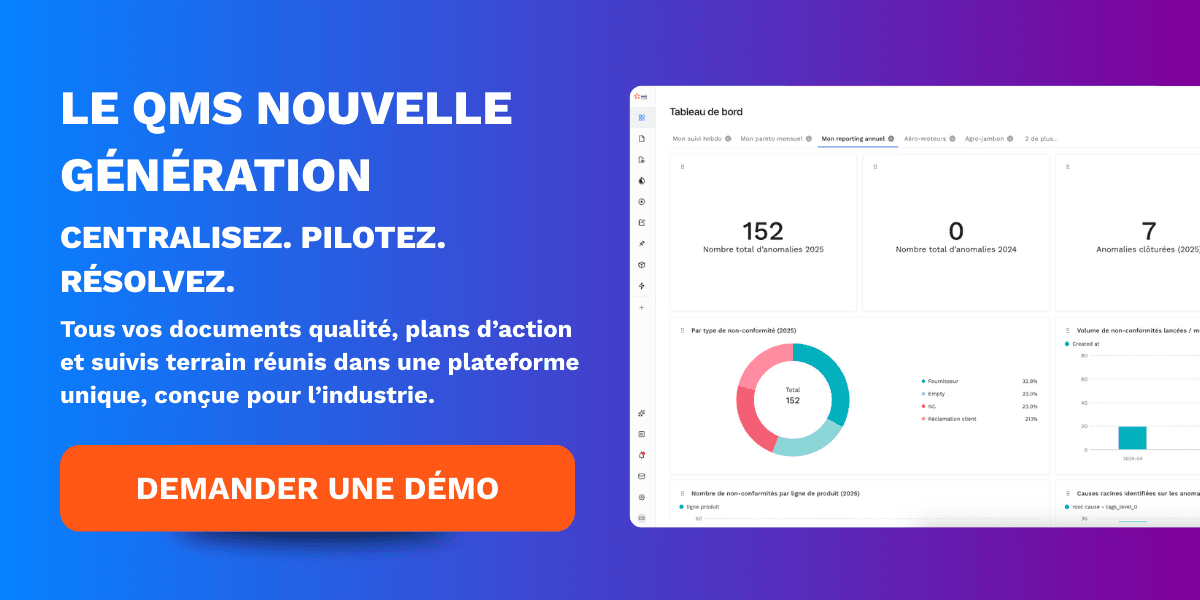
Dashboards and quality KPIs
A QMS software without dashboards is just another folder.
KPIs must be configurable according to your processes: non-conformance rate, average CAPA closure time, document compliance, etc.
Dashboards must offer site, line, and product views, with drill-down capabilities for operational analysis.
Favour exportable visuals and alerts on KPI deviations.
Data must remain actionable: the dashboard must allow for generating an action or task directly from the indicator.
Technical and integration criteria
ERP and CRM compatibility
A QMS software must integrate naturally into your IT ecosystem.
Exchanges with ERP, PLM, and CRM avoid duplicate entries and guarantee data consistency.
Favour a solution offering documented REST APIs and native connectors to SAP, Oracle, Microsoft Dynamics, or common CRMs.
The synchronisation of bills of materials, batches, and customers automates the creation of non-conformances and CAPAs.
Request production integration use cases and SLAs on data transfer.
We recommend evaluating latency, conflict management, and error recovery mechanisms.
Finally, test the integration in a sandbox to measure the actual effort of implementing the QMS software before signing.
Scalability and multi-site management
Industrial deployment requires a QMS software that scales.
The solution must support functional scale-up (added modules) and volume scale-up (sites, users, events).
Check multi-tenant capacity, data partitioning options, and cross-site rights management.
Linguistic localisation and regulatory compliance by country are major assets.
Evaluate how easy it is to onboard new sites and centralise KPIs for group management.
We advise validating customer feedback from organisations similar to yours to assess actual scalability.
Data security and cloud hosting
Security is non-negotiable for a QMS software.
Demand compliance with standards (ISO 27001, SOC2) and clear information on encryption in transit and at rest.
Check the proposed hosting modes: multi-tenant SaaS, dedicated instance, or on-premise.
Resilience (high availability), regular backups, and disaster recovery plans must be documented.
Request data localisation (region/zone) for regulatory constraints.
We systematically include security audits in our proofs of concept and favour suppliers who are transparent about their security practices.
User experience criteria
Interface and ergonomics
Adoption depends primarily on ergonomics.
A QMS software that is too complex slows down usage and generates paper workarounds.
Favour a modern, responsive, and business task-oriented interface.
Screens must display high-priority actions, current workflows, and associated attachments.
Full-text search, dynamic filters, and custom views increase operational efficiency.
Test the tool with real profiles (operators, quality managers, IT) to measure the completion time of a key task.
We recommend usability sessions before deployment to address pain points and ensure rapid adoption of the QMS software.
Training and customer support
Training accelerates value.
A QMS software must be delivered with training modules, video tutorials, and up-to-date documentation.
Opt for a publisher offering structured onboarding, business workshops, and responsive support (SLA, hotline, chat).
Measure the cost and availability of multilingual support and the quality of self-service resources.
We recommend planning for internal 'super-users' to maintain adoption and reduce dependence on external support.
A good training programme transforms a tool into an engine for continuous improvement.
Financial criteria and pricing models
Subscription vs license vs freemium
The business model has a direct impact on TCO.
A SaaS QMS software reduces upfront costs and facilitates updates.
An on-premise license may be appropriate if you have sovereignty or heavy integration constraints.
The freemium model can be useful for pilots, but watch out for functional limitations and upgrade costs.
Compare what is included: hosting, backups, integrations, support, and advanced modules.
We recommend prioritising pricing transparency and requesting a 3–5 year estimate to assess actual ROI.

Hidden costs and overall budget
Anticipate indirect costs related to QMS software.
Data migrations, training, workflow adaptations, and ERP/PLM integrations often represent significant Budgets.
Ask precise questions about API fees, active user costs, and scaling fees.
Include governance costs (internal resources) and audit testing in the budget.
We help our clients model the total cost of ownership to avoid surprises and ensure a measurable ROI.
Innovation and differentiation criteria
Features powered by artificial intelligence
AI is a game-changer for QMS software.
Predictive analysis, automatic recurrence detection, and smart non-conformance classification features accelerate resolution.
Automatic CAPA suggestion, data extraction from PDF reports, and risk/impact-based prioritisation are differentiating features.
Check the level of AI (assisted vs autonomous) and model transparency to avoid black boxes.
We integrate AI building blocks to help customise actions and detect anomalies before they become critical.
Product roadmap and update frequency
The roadmap reveals the publisher's vision.
A QMS software must evolve regularly to keep up with standards, user expectations, and new technologies.
Request a public roadmap, release frequency, and client request management processes.
The ability to deliver sector-specific features (IATF, EN 9100, ISO 45001) quickly is a key indicator.
We evaluate product-client proximity and favour publishers who release frequent updates with clear release notes.
Implementation best practices
Project phasing and governance
A successful deployment follows a structured plan.
Start with precise scoping of processes, a pilot on a restricted scope, and then an iterative rollout.
A QMS software must be configured on concrete cases before scaling up.
Set up project governance with business sponsors, an IT project manager, and super-users.
Measure success indicators (adoption KPIs, non-conformance rate, CAPA closure time).
We recommend clear milestones and feedback loops to adjust scope and accelerate value.
Change management and adoption
Technology alone is not enough without buy-in.
Prepare a communication plan, practical sessions, and local champions.
A QMS software must demonstrate quick wins to convince teams.
Collect and address user feedback continuously to improve ergonomics and processes.
We support organisations in change management with playbooks, training materials, and adoption KPIs to secure the transition.

Use cases and industry testimonials
Success story in aviation
In aviation, traceability and compliance are vital.
A QMS software enabled a prime contractor to automate supplier deviation management.
Average CAPA processing time was reduced by 45%.
Customer audits were carried out without major findings thanks to time-stamped proofs linked to batches.
Workflows standardisation improved product quality and reduced production rework.
We document these successes to inspire similar deployments in regulated environments.
Feedback in the energy sector
In the energy sector, incident management and safety are priorities.
A QMS software consolidated maintenance records and HSE incidents across multiple sites.
Centralisation made it easier to analyse root causes and reduce recurring incidents.
Multi-site management and consolidated KPIs allowed for the prioritisation of corrective investments.
Field teams adopted the tool thanks to mobile access and simple workflows.
We use this feedback to calibrate sector-specific deployments and accelerate business value.

Conclusion
To summarise the key lessons of this guide and help you take action, here is what you need to remember and do right now.
A QMS software is above all a performance and compliance lever, not just an IT tool.
It must structure the PDCA cycle, centralise document management, track non-conformances, and drive CAPAs with automated workflows.
Native connectivity with ERP/PLM/CRM, multi-site management, and cloud security (SaaS or dedicated instance) are prerequisites for a sustainable industrial deployment.
When choosing, prioritise features that deliver measurable quick wins: reduction in CAPA processing time, improvement in QMS KPIs, and better preparation for quality audits and ISO 9001 compliance.
Validate usability with real profiles (operators, quality engineers, production) and demand integration scenarios tested in a sandbox.
Do not underestimate project governance: business sponsor, super-users, and a change management plan are essential to guarantee adoption.
On the technical and financial side, ask for concrete proof of scalability, REST API integration cases with SAP or Microsoft Dynamics, and a 3-5 year pricing estimate including migrations, training, and integration costs.
Opt for transparent pricing and a SaaS model if speed of implementation and regular updates are priorities, while checking data sovereignty if necessary.
Innovation matters: AI modules for detecting recurrences, prioritising actions, and automatic extraction from PDFs bring an operational advantage, provided you demand transparency on the models.
In practice, launch a pilot on a restricted scope, measure indicators (non-conformance rate, CAPA closure time, user adoption), and iterate before scaling up.
Document feedback, formalise templates and winning workflows, and then industrialise the deployment site by site.
Good governance and a sustainable training plan transform the tool into a true engine for continuous improvement.
If you are looking to accelerate this process, our teams support industrial companies in the scoping, selection, and deployment of QMS software tailored to the constraints of aerospace, energy, and automotive.
We provide secure proofs of concept, business workshops, and change management playbooks to guarantee quick and measurable gains.
To go further, download our sector resources, schedule a product demo, or request a quality maturity diagnostic to identify priorities and estimate your project's ROI.

Continue reading
The latest innovations in Industry 4.0